I consider myself a seasoned self-hoster. I don't write code or do any kind of scripting in any of the languages used; I'm just not that bright! But I don't mind getting my hands a little mucky in the terminal when things go a bit bonkers, which they sometimes do.
I use a self-hosting platform called Yunohost. I've had it in place now for about five years, and I pay no subscriptions to anyone. Well, that’s a bit of a fib; I have recently started paying 10 euros a month to the folks at Yunohost because they do such a good job.
When you install the platform, you get a free domain; mine is casper.nohost.me, which I use to test various apps before releasing them out on their own domain later.
What do I host?
File management & sharing: Nextcloud, with Collabera & Nextcloud Office (a full office suite)
Music: Navidrome (There are some fantastic clients for this server app)
Photos: Piwigo (Phone auto-uploading, galleries, and sharing)
Accounts: Invoice Ninja (Free community edition, server app, and clients)
Websites: WordPress , and now trying out Pure Blog
Email: Comes with a full email stack
That's my digital life in a nutshell. All of the above apps have a mobile app, or are mobile-friendly. You can see all the stuff that I self-host here
Now, I'm not saying that it's all been plain sailing; yes, there is the odd hiccup, sometimes when an app gets updated, but these issues are always fixable. There is a full backup and restore service included witht the platform, and a good and reliable collection of apps to put on your server, oh, and the forum community is excellent.
In summary
I pay absolutely no subscriptions to anyone. (Well, not quite). The 10 euros to Yunohost is voluntary, but for the work the community does, I feel it's the right thing to do. I'm being economical with the truth, again. I do pay yearly for a couple of domain names. There are no direct debits or standing orders being paid to anyone other than Yunohost and my domain registrar. And if I want to disappear...? I just pull the plug...!
Do you prefer using an electronic device like an iPad with an Apple Pencil? Or perhaps you have one of those lovely Remarkable notebooks? Or do you still enjoy the classic way with paper and pen?
I mostly use my laptop or phone for everything. I like Apple Notes and DevonThink, but I also love jotting things down quickly with pen and paper.
I discovered Rocketbook, the reusable notebook, and decided to give it a shot back in December 2025. I picked up the Fusion legal-sized notebook and a three-pack of Pilot Frixon pens from my local stationery shop—they come in black, blue and red. Very handy! I used the Rocketbook app, which was alright. What really stood out was how well it transcribed my handwriting. My handwriting isn’t perfect, but it got it right about 95% of the time, which was enough to copy the transcribed text into a document I needed to share.
Then came the disappointing news that BIC, the company behind the Rocketbook name and IP, was pulling out of support. It’s a shame. Yes, the app will be supported for another year, but what happens then? The books are now available at huge discounts.
So, what should I do?
Electronic note-taking devices are generally quite good, but what if something goes wrong with the device? You’d have to get it fixed, which can be expensive. What if the battery dies? You’d have to replace it, which isn’t great for the environment either. What if it gets stolen? (How’s your backup working? Is the device locked? Anything private?)
The reusable Rocketbook notebook. You can scratch out your notes, take a photo, wipe it clean and start fresh. That’s a pretty good idea. The books are cheap, especially now. You can get the Frixon pens at any stationery shop, well, almost. It’s good for the environment because I only need one book, no batteries or charging to worry about, and no repairs.
And what about transcribing my notes? The Rocketbook app was the best in all the tests I did for transcribing my handwriting. I tried the following:
CamScanner - Didn’t quite get my notes right.
Adobe Scan - Needs a monthly subscription to transcribe.
Google Lens - Didn’t work for me.
Google Drive - Needed Google Docs, but it just wouldn’t cooperate.
Nextcloud Scan - Gave a good preview, but saving it as the preview was a bit tricky.
Pen to Print - pricey if you didn’t transcribe often.
None of these options was perfect, and some features required a subscription. Instead, I took a photo of my notes and uploaded it to an AI chatbot like ChatGPT or CoPilot, asking it to transcribe. It was almost spot on, and with ChatGPT, I even got a summary of the notes! It was fantastic. Sure, you might need to pay the chatbot a monthly fee (on ChatGPT, I used four image uploads before my free quota expired for the day), but if you upload lots of images, the bot can do much more than just transcribe your notes.
I’m not saying I don’t love electronic note-taking. I use Apple Notes and DevonThink every day at work and in my personal time, but sometimes I prefer writing and being able to jot down notes during meetings instead of typing like a court stenographer. But the reusable notebook is definitely a winner. It’s affordable and good for the environment; what’s not to like?
So, if you’re a Rocketbook user and a bit bummed about BIC’s withdrawal, don’t worry! Buy the books—they’re so cheap now. But maybe grab some Pilot Frixon pens from your local stationery shop. Use the Rocketbook app until it’s no longer available, or someone takes over, or just take a photo of your notes, use a chatbot to transcribe them and then copy and paste them wherever you need.
Work in 2025 has been pretty good, a busy year really, but, still managed to get some good travel in. Not bad. My thing these days is to get a good work-life balance in. I've had it with chasing work.
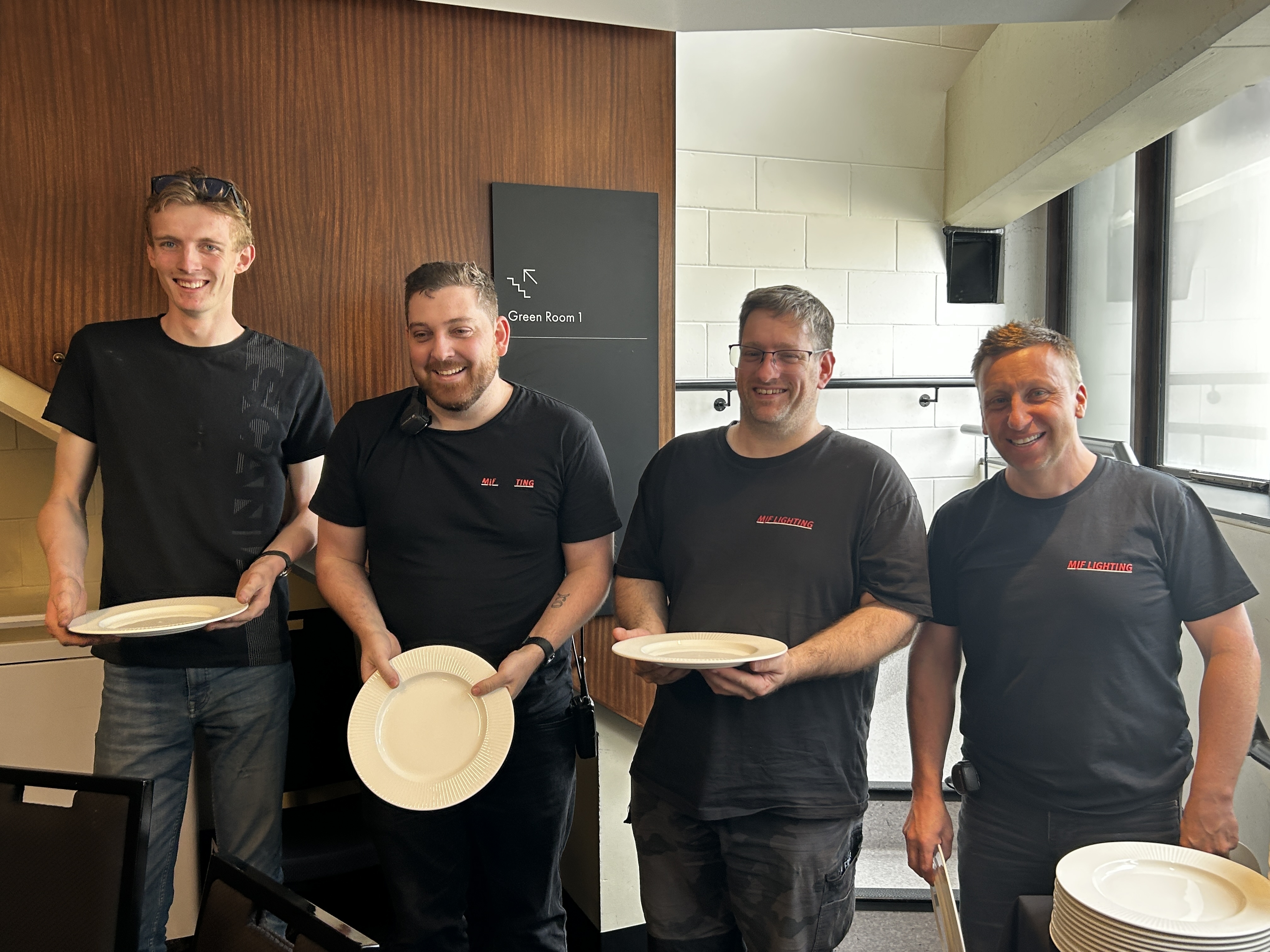
Did a nice little tour in Oz and NZ with this bunch of lovely people though, just as the year closed.
This is the Oz crew who were fabulous.... Thanks gang...
However.... Get this lot... This was the fantastic lighting crew from NZ.
My current lighting desk is a Vista by ChromaQ. I have two surfaces, the MV and an EX. With all the other bits like a good screen and all the cables, etc, to make it work, it goes into a Peli case that weighs 26kgs, Ideal for flights. Indeed, this set-up has been all over the world on all kinds of gigs and it has never, but I mean, never let me down..!
Despite the reliability of my system, it's always in the back of my mind that I don't have any kind of backup. I have the potential for surface failure or laptop failure, or worse, both! This is no different, of course, from any all-in-one lighting desk; in fact, an all-in-one system is very vulnerable in the event of failure. But let's be honest, the reliability of all these systems, whether it's all in one box or separate computer or surface, is very good today, and no, I don't want to get into a desk-bashing forum here...!
Sure, I can have another laptop on the same network as the spare console and the rig silently tracking, and just move the dongle between the two laptops, but I'm so scared that I will lose the dongle, which the Vista system uses, and to replace my 4098 channel dongle would be too much of a hard, and embarresing pill to swallow. Believe me, I know, I've lost one before, many years ago!!! Doh!
So what options are there for some kind of backup?
Options. What are they?
1. Buy another surface and a second dongle. Obvs!
Lots of expensive kit to cart about. But this might work for you in your case, or in a fixed rig environment.
Pros: The best and most reliable way of having a tracking backup. The "real" way to do it. Cons: Expensive. Needs another Peli case and more space. So now I'm dragging two desks around!
2. Buy just another dongle.
Not as expensive as the first option. Two laptops in the same network, each with a dongle, but those dongles are still pricy!
Pros: Gives a reliable and stable tracking backup. Cons: No surface, so if your show is complicated and requires a lot of button and fader work, then it might be fiddly playing back on a laptop, plus if you have a two-screen layout, you will find that the backup laptop will gather all of the Vista windows into one screen, unless you have a backup screen as well, so will require a bit shuffling about to get to where you want be.
3. Use a KVM switch or just a USB A B switch.
This keeps your system in place, a surface, a screen and two laptops, a main and a backup laptop again in the same network.
Pros: Cheap... Requires just a tiny investment in a USB A B switch. It works! Cons: Don't buy a cheap switch; buy the best you can get. How your system is built may require a bit of replugging. It means that the dongle is out and about. There might be a bit of delay while the hardware detects the licence and completes the handshake with the dongle, etc, and you could hit a Vista "no dongle inserted" thing!
4. Install a lighting cue recorder.
This is a small box that listens to Ethernet/DMX on the network and triggers a cue or sequence when there is no Ethernet from the desk.
Pros: Gets the lights up on stage with no replugging anywhere. Space footprint is small. You can play a single static cue or a full sequence that you grab from your desk. Cheaper than a second dongle. Keeps the dongle in the hardware. Nice and safe, for me anyway! Cons: There is NO tracking, there is no second laptop, so choose your triggered cue or sequence carefully!
Believe me, I have looked and tried all of the above options.
If I'm on a tour, or a biggish gig in my home territory. I'll get production to provide a full backup, surface, dongle, laptop and screen. A full mirrored setup. The issue I have is that any size of show overseas is that not everyone has or can get a Vista system; I'm on my own. Small gigs/lighting providers don't have Ethernet; they are still on copper, yes, they do still exist! My system is just right as it is for what I do, so I need to find a simple, reliable, no-fuss way of getting lights up! As I've said, I don't like having the dongle out of the surface, especially on load-ins and outs, "shit, where's the dongle...?" I never want to have to say that.
Option 1. I really can't afford it! The money, the space and the weight. I'm just a sole trader who does lights and has my own desk. But where I can, I get production to replicate mine
Option 2. The dongle price for existing users, etc, is still too expensive, which I get. Maybe a different licensing system is now required? I use Capture, and the licensing system there is quite nice.
Option 3. I will lose the dongle, whether it's a switch or just hot-swapping the dongle between computers.
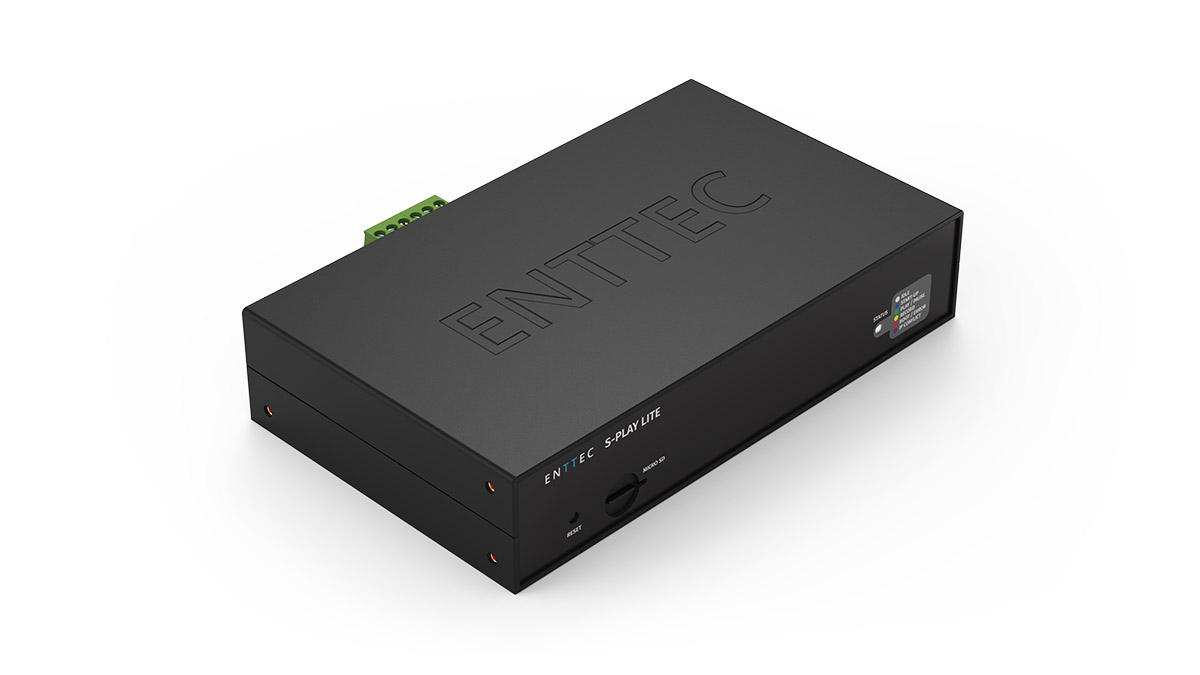
Option 4. This is my current chosen way of "...shit! Quick get some lights up..." solution. There are a couple of DMX recorders, but I favoured the Enttec S Play Lite. It is a tiny box, so easy to store and move around. It will store single static cues, which is good enough, but it will also store full sequences. 16 universes of ArtNET or streaming with 2 physical DMX outputs.
The tiny Enttec S-Play Lite
However... Do we really need a backup nowadays?
If you go to, or do gigs these days, you will not see kit 'backed up'. I've never seen a spare FOH sound desk, monitor desk or VT mixer. Sure, they may have a UPS's etc, but that's to protect against a power outage; but if the amps go off or the lights lose power, all the UPS is doing is keeping the control end active until the amps, etc, come back on, the lights have reset, and the LED screens have powered up. However, I have been to gigs and seen spare lighting desks. Why's that? We have all seen it and done it, 2 GMAs, a pair of Hogs, etc. Curious.
There are many reasons. For me, it's a hobby, but it might be different for you, of course. I have also become more resistant over time to letting big corporations be responsible for my data. How many times have you heard that such and such has been hacked? Of course, that can happen to anyone self-hosting as well, but at least I will be responsible for any loss. I can also react quicker and shut it all off, and as long as I have a backup, I can rebuild and be up and running again quite quickly.
So, what do I self-host, and how did it come about?
Back in the day, my email was hosted by FastMail and my files by SugarSync. Ah, those were the days. To be fair to them both, they were never hacked while I was with them, but I quite liked the idea of having everything under my control, files, photos and music, but how? I'd heard and seen a demo of OwnCloud. It was a file-sharing and sync server; it was in its infancy at the time and a pain to get and to keep going.
I invested in a QNAP NAS, a small but slow one to start with. It was quite good and did more or less what I needed. I could store and share my own files and photos, and music, but my email was still with FastMail. The slow speed of the server started to become a pain, so I upgraded to a larger, faster model. Now we were talking. It was a much better experience. I also had a slow Raspberry Pi that ran the file sharing and application suite, Nextcloud. Again, Nextcloud was a bit troublesome, but it soon made rapid improvements. It’s just that the Pi could not keep up with the demand of Nextcloud, and I found it offline more than on.
While on a trip, I was searching the internet for self-hosting solutions and discovered, by accident, a community of people that had put together a self-hosting server called Yunohost. A bit of an odd name, but it had a good application catalogue that included Nextcloud for files, Piwigo for photos and Navidrome for music.
My new fast QNAP NAS came with an app called Virtualisation Station, which allowed you to install a full operating system in its own container. Interesting, I thought, and installed Yunohost into a container and set it up to speak to the outside world. It was a eureka moment. It was quick and very stable, and very soon I had Nextcloud working and usable. Next, I moved my website over, which was easy to do; all I had to do now was move my email over. A scary thought indeed.
With the fantastic help of the Yunohost community and some fiddling with DNS records at my domain registrar, I was off and running. Now I had everything I needed, working from a small server in my garage at home. Excellent… until… I was hacked! There were a bunch of hackers that had been targeting QNAP NAS machines online, and mine was one of them. I was locked out with ransomware. My blood turned cold when I logged into the server and saw the message. Fortunately, the container that my new test server was in was isolated from the ransomware that had changed the file name of every file on the system, but the isolated server within the server was still clean, and I had a backup, but everything else was gone; the backup was 4 weeks out of date. No way was I going to pay £530 in bitcoin to release my files. Instead, I wiped the QNAP NAS clean and sold it. I couldn’t wait to get it out of the house; never again will I buy a QNAP product.
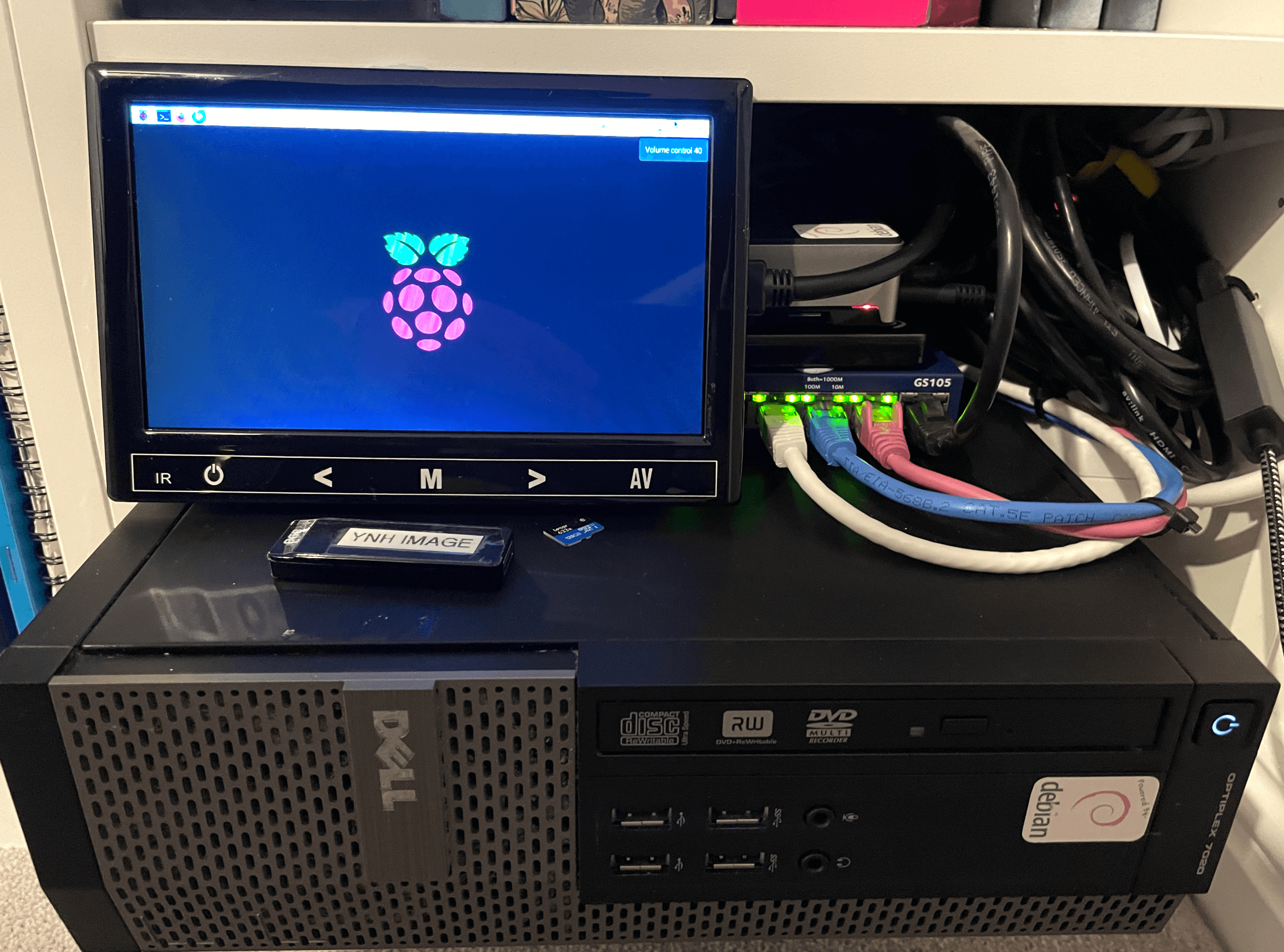
The next day, I bought a small form factor desktop computer on Amazon, installed Yunohost and restored from my backup. Since that day, five years ago, I have had a flawless system; only once was I hacked with some porn on my photo server, and that was my fault and was quickly fixed.
Pros and Cons
So what are the pros of self-hosting?
The obvious one is that you are in control of your data.
If you do the right thing, your data will be safe.
Cheaper. Online service providers are charging more and more each year to host your stuff. Sure, there are free services, but they are not really free.
...and the cons?
Power outages that are out of your control. UPS? Backup?
You must keep the system up to date to avoid security breaches.
Keep the server apps up to date.
Don’t forget to backup.
If the system fails, you will need to recover from it.
If you are hacked, you will need to recover from it. Make sure that the apps are set up correctly and understand permissions. Again, porn was dumped on my photo server due to bad permissions. I’ve learnt since!!!
You’ll need an understanding of how the internet works; things like DNS and DNS records will suddenly become a new thing for you to learn and understand.
Is it really worth it?
If you have the time, do some preliminary research and try a bit of trial and error work, then yes, it is worth it. My server runs smoothly, is backed up every day, and is updated weekly. I have several websites on my server, including photo galleries, file storage and sharing, as well as a large music library. Sure, I have faced a few ups and downs, but with some reading and help from the community, I have been up and running within a couple of hours. You will also gain a good understanding of how networks and the internet work. It's very rewarding to know that everything is under your control and knowledge. You don't need to know too much, but the more you learn, the more beneficial it is to keep your homelab server running.
My Yunohost Homelab
Have a look at my set-up at digitalcarnage.co.uk, and if you have any questions, do reach out
 Derek Jones