Back in 2008, I was looking to own my own lighting desk. I don't know why, I just did, it kinda felt like the right thing to do at the time, I could operate a Whole Hog and an Avolites desk. I was also, before then, quite proficient on the Vari*Lite consoles. Whatever happened to them? Ah, them's were the days. I had just been asked that year to do the set and lights for the Cliff Richard and the Shadows' World Tour, so I thought that would be a good opportunity to buy a desk, but which one?
One wet Wednesday, I was in a well-known lighting hire company's warehouse, and they had a Jands Vista S3 console setup and running it with a MacBook. They allowed me to have a look and to play around with it. I liked it, I liked it quite a lot. There were a few things that I couldn't quite get my head around. The approach to some things was quite a bit different from what I had previously known, so I put the software on my laptop, took it home, and spent a lot of time with it. Soon, I was finding my way around it quite quickly and developing some new muscle memory along the way.
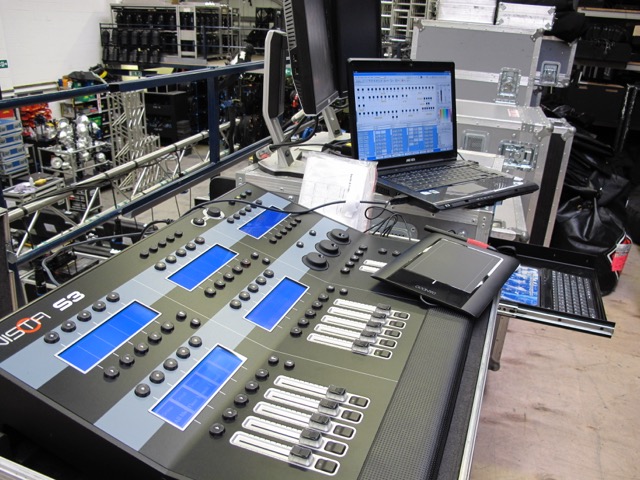
Quite by chance, the S3 came up for sale, complete with an unlimited dongle and the MacBook, so I took a deep breath and bought it. My newly acquired Jands Vista S3 was going on a world tour with an, at the time, large and well known act. Had I done the right thing? Fortunately, it was already flight-cased and ready to go.
My first Jands Vista setup. (with Catalyst)
The tour consisted of a large screen, 20m x 5m of high-resolution LED screen, that was it, really, and a pile of lights. The idea was to push all 5 cameras and content to the screen, make them spin and slide on and off and tumble through a Catalyst media server, which would be fired by my desk along with the lighting, quite a challenge back then. Of course, these days it's easy peasy, but back then, in 2009, it was considered a challenge.
I had help from a wonderful chap, Andy Ryhmes. I'm sure he won't mind a mention here. He was brilliant on the Catalyst side of things and getting the Vista to talk to it. After three weeks in rehearsals, we had a show, a great show that went down a storm. A happy client and happy fans. With my new confidence, I was ready to say goodbye to Andy and face the world on my own.
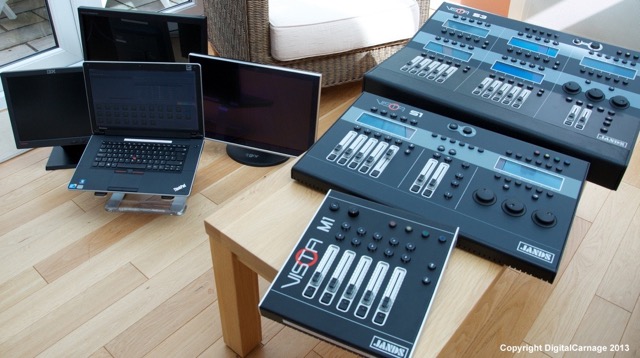
The tour was a great success, and I continued to do lots of work with my S3, which I soon added to with an S1/M1 combo for smaller gigs. There were plenty of gigs for them all, and my desks were always busy. I loved it!
My Jands Vista Collective...
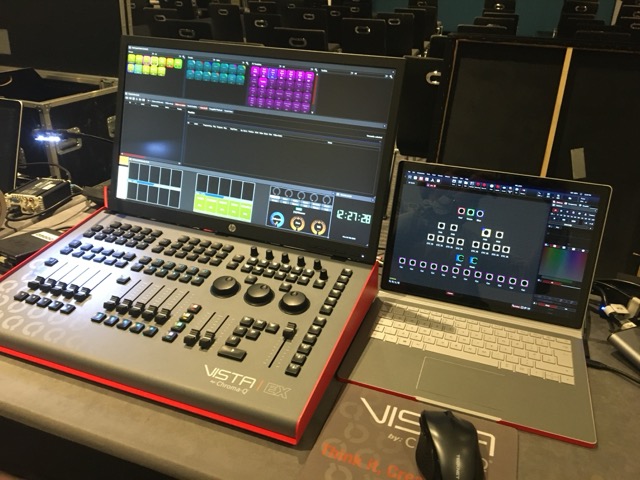
One day, while touring in Europe, with a band that will remain nameless, I learnt the news that ChromaQ in Canada had acquired the rights to the Jands Vista brand. I was shocked and a bit nervous, but a quick call to the wonderful Jack Moorhouse soon put those fears to rest as he told me the future was good for Vista. he wasn't wrong. I bought the new Vista MV and EX combo, which I have had ever since. This little system has worked very hard for me, with the whole system fitting neatly into a single Peli case, under 32 lbs, just, and has been all around the world doing music tours, corporate events and once of events. Each new release of the software brings something new and useful. I have never ever had a single problem with.
As a side note, I was on a corporate gig in Wembley two years ago, and the console was my old S1/M1 system that I sold. Awww!
I'm not into console wars; they all do the same thing now, especially my Vista by ChromaQ. I'm quite happy to sit on a riser with my small footprint console, providing what my clients want. I have, over the years, fraternised with the GMAPC and the Chamsys desks. I like the small form factor, I like just jamming it all into a Peli and leaving for a hotel or airport, pulling it behind me.
My current Vista by ChromaQ setup
I'm looking forward ot seeing more from Vista by ChromaQ in the future. Bring it on...
Back in 2009, I was introduced, hooked on, and purchased my first Vista lighting desk. At the time, it was under the Australian company, Jands, who designed, built, and sold it, which at the time, and some would argue today, was a rather unconventional lighting control desk, which did the job but in a different way.
Fast forward to today, and Vista is now part of the Canadian lighting manufacturer and distributor, ChromaQ. I have to say that as a user, for all those years, I have seen it come on in leaps and bounds, and since ChromaQ took Vista on, it has become an even better piece of lighting hardware & software. I have to admit though that I have, fraternised with other systems, but in the end, I stayed with Vista by ChromaQ.
Why Vista...?
I'm a simple man, and I always require simple solutions. I also need portability and the Vista system fits neatly into a Peli case that I have dragged around the globe since 2011, it's my own desk, I keep it in good order, the software is always up to date as well as my fixture library. I am responsible for it, and only me.
The system, more importantly, is easy to use. It can do what any other lighting desk can do, some things better, some maybe not so good (I've not really found ant TBH). That can be said, however, about all hardware/software devices; lighting desks are no exception. I don't do the lighting desk wars. I've turned up to many a festival or gig, and received sniggers from local lighting crews. It's satisfying to watch; later, their expression changes when I've rocked up, plugged in, and done a great show. They all nod their approval and truly marvel at the speed and agility of the system; they are genuinely impressed. I'e turned up to afew places and people have said."Oh, I've not see none of these before". (Where have they been?)
The dreaded dongle?
I have to admit. I wasn’t keen on it way back when I bought it, and I'm still not keen on it now, and that’s the dongle model. What a pain in the ass that really can be...?
The idea, I guess, is that if you have a small budget, you can start with 512 channels with a small surface and, bang! you have a good cheap lighting desk. The more money you have, the more channels you can buy. I have 4096 channels or 8 universes (8U). The issue is, fixtures that are coming out, almost daily have so many modes that they swallow so many channels. An Ayrton Perseo, for example, in extended mode is 61 channels; some fixtures have considerably more, especially the flashy "program each pixel" type fixtures, battens, tubes, and LED bricks.
In the past five years, I have been doing some rather large corporate gigs. The last one was back in January 2026, I needed 32 universes! We had dozens of LED tubes each in 121+ channel mode, Perseos in full mode, washes all with individual pixel control, it just went on and on and on...
To get it all working, I had to use a mains powered 6-port hub, as well as the socket inside the EX itself. Now, that’s no big deal in its self really, is it? Inside any lighting desk, it's just a motherboard, an OS, and some USB ports, but everything is hidden under a nice piece of hardware.
So I turn up with a fistful of dongles and a USB hub, which makes the whole set-up look like a home lab computer set-up. In the end, I just made sure it was all nicely labelled up and thrown around the back out of view... What the eye doesn’t see, etc...!
I'm not really moaning? Am I? The Vista system, since its conception, was to allow for folk on tight budgets, folk, that in the future will grow, and folk, who want to go all in, to be able to afford a lighting desk, no matter what the budget or discipline they were in. But is it time to get away from the physical plug in dongle now? These pesky little things that you can lose, and or break. (I should know, I've done it twice since 2012! Careless).
Vista is the only lighting desk using a physical mechanical device to add DMX channels to a lighting desk, if there are others then what I'm saying applies to those desks as well. For most lighting consoles the amount of DMX universes are baked into the desk. Most compact consoles now come with a minimum of 24U all included in the price. Take for example the latest desk from AVO, the D3 with 24U straight out of the box. How about the Chamsys MQ70, again 24U.
Here's the thing though. If I had an AVO D3 on my 32U gig, how would I have done that gig? So maybe the stacking dongle thing is not so bad after all...?
It's all about cost?
If you were to buy a Vista EX, add an 8U dongle, get it all working with a good computer, then you'll have an 8U lighting desk, for what? £6000.00? Spend just under £10,000 for an AVO D3 or an Chamsys MQ70 and you'll have a 24U lighting desk. So it's almost double the cost, but you are getting 8U extra!!! What's not to like there...? However, if you are a small church, say, and there are many that use the Vista, you can get an MV and a 512 dongle, super cheap. By the way. Why is the Vista so popular with churches. Is it that different dongle cost thing?
I'm staying with Vista by ChromaQ, I am, all in. I know it well, it has done me a great service on every gig. I have contacts that I can hire extra dongles from if I need more that the 8U I already own. I'd just like to not bother I think with the whole mechanical USB thing. It's another physical point of failure.
Another way?
If ChromaQ want to carry on with the "pay as you grow" model of console selling, is it not time to change to a software based licencing key, similar to the licencing used by say Capture, the visualisation software? How about just 'hard-wireing' your selected universes into the console like everyone else is doing?
These are just my ramblings on the issue. I'm sure it's not as straight forward as it all sounds be it technically, or more important, financially.
My current lighting desk is a Vista by ChromaQ. I have two surfaces, the MV and an EX. With all the other bits like a good screen and all the cables, etc, to make it work, it goes into a Peli case that weighs 26kgs, Ideal for flights. Indeed, this set-up has been all over the world on all kinds of gigs and it has never, but I mean, never let me down..!
Despite the reliability of my system, it's always in the back of my mind that I don't have any kind of backup. I have the potential for surface failure or laptop failure, or worse, both! This is no different, of course, from any all-in-one lighting desk; in fact, an all-in-one system is very vulnerable in the event of failure. But let's be honest, the reliability of all these systems, whether it's all in one box or separate computer or surface, is very good today, and no, I don't want to get into a desk-bashing forum here...!
Sure, I can have another laptop on the same network as the spare console and the rig silently tracking, and just move the dongle between the two laptops, but I'm so scared that I will lose the dongle, which the Vista system uses, and to replace my 4098 channel dongle would be too much of a hard, and embarresing pill to swallow. Believe me, I know, I've lost one before, many years ago!!! Doh!
So what options are there for some kind of backup?
Options. What are they?
1. Buy another surface and a second dongle. Obvs!
Lots of expensive kit to cart about. But this might work for you in your case, or in a fixed rig environment.
Pros: The best and most reliable way of having a tracking backup. The "real" way to do it. Cons: Expensive. Needs another Peli case and more space. So now I'm dragging two desks around!
2. Buy just another dongle.
Not as expensive as the first option. Two laptops in the same network, each with a dongle, but those dongles are still pricy!
Pros: Gives a reliable and stable tracking backup. Cons: No surface, so if your show is complicated and requires a lot of button and fader work, then it might be fiddly playing back on a laptop, plus if you have a two-screen layout, you will find that the backup laptop will gather all of the Vista windows into one screen, unless you have a backup screen as well, so will require a bit shuffling about to get to where you want be.
3. Use a KVM switch or just a USB A B switch.
This keeps your system in place, a surface, a screen and two laptops, a main and a backup laptop again in the same network.
Pros: Cheap... Requires just a tiny investment in a USB A B switch. It works! Cons: Don't buy a cheap switch; buy the best you can get. How your system is built may require a bit of replugging. It means that the dongle is out and about. There might be a bit of delay while the hardware detects the licence and completes the handshake with the dongle, etc, and you could hit a Vista "no dongle inserted" thing!
4. Install a lighting cue recorder.
This is a small box that listens to Ethernet/DMX on the network and triggers a cue or sequence when there is no Ethernet from the desk.
Pros: Gets the lights up on stage with no replugging anywhere. Space footprint is small. You can play a single static cue or a full sequence that you grab from your desk. Cheaper than a second dongle. Keeps the dongle in the hardware. Nice and safe, for me anyway! Cons: There is NO tracking, there is no second laptop, so choose your triggered cue or sequence carefully!
Believe me, I have looked and tried all of the above options.
If I'm on a tour, or a biggish gig in my home territory. I'll get production to provide a full backup, surface, dongle, laptop and screen. A full mirrored setup. The issue I have is that any size of show overseas is that not everyone has or can get a Vista system; I'm on my own. Small gigs/lighting providers don't have Ethernet; they are still on copper, yes, they do still exist! My system is just right as it is for what I do, so I need to find a simple, reliable, no-fuss way of getting lights up! As I've said, I don't like having the dongle out of the surface, especially on load-ins and outs, "shit, where's the dongle...?" I never want to have to say that.
Option 1. I really can't afford it! The money, the space and the weight. I'm just a sole trader who does lights and has my own desk. But where I can, I get production to replicate mine
Option 2. The dongle price for existing users, etc, is still too expensive, which I get. Maybe a different licensing system is now required? I use Capture, and the licensing system there is quite nice.
Option 3. I will lose the dongle, whether it's a switch or just hot-swapping the dongle between computers.
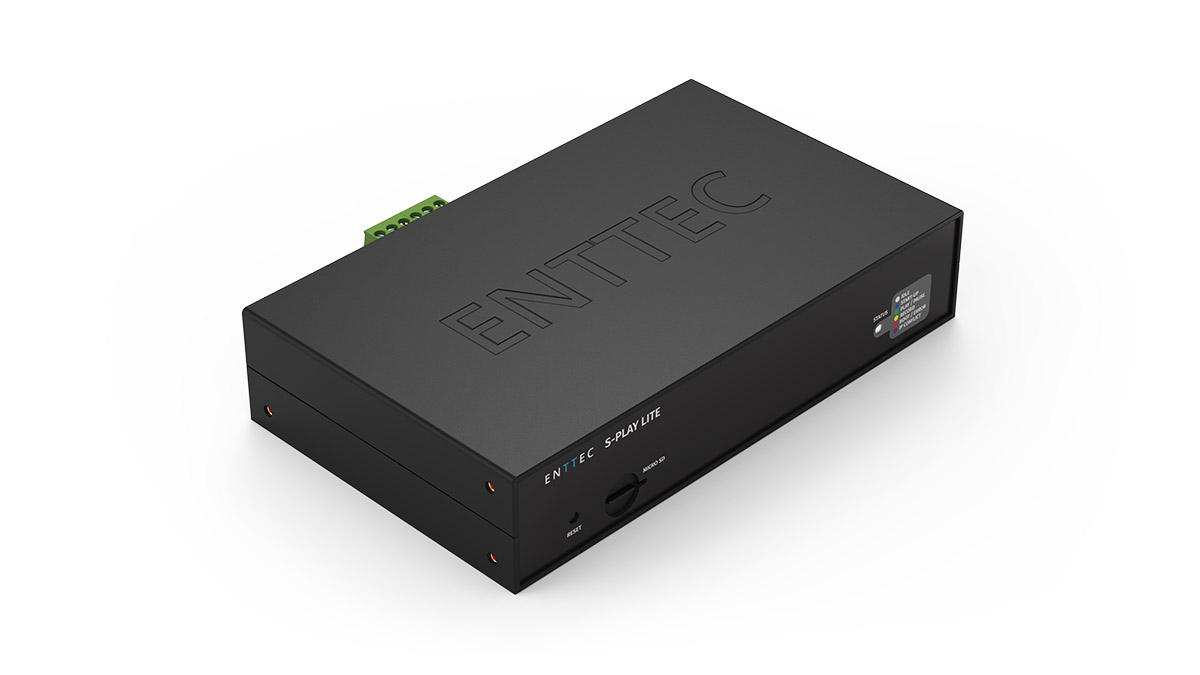
Option 4. This is my current chosen way of "...shit! Quick get some lights up..." solution. There are a couple of DMX recorders, but I favoured the Enttec S Play Lite. It is a tiny box, so easy to store and move around. It will store single static cues, which is good enough, but it will also store full sequences. 16 universes of ArtNET or streaming with 2 physical DMX outputs.
The tiny Enttec S-Play Lite
However... Do we really need a backup nowadays?
If you go to, or do gigs these days, you will not see kit 'backed up'. I've never seen a spare FOH sound desk, monitor desk or VT mixer. Sure, they may have a UPS's etc, but that's to protect against a power outage; but if the amps go off or the lights lose power, all the UPS is doing is keeping the control end active until the amps, etc, come back on, the lights have reset, and the LED screens have powered up. However, I have been to gigs and seen spare lighting desks. Why's that? We have all seen it and done it, 2 GMAs, a pair of Hogs, etc. Curious.
Back in 2008, I was looking to own my own lighting desk. I don't know why, I just did, it kinda felt like the right thing to do at the time, I could operate a Whole Hog and an Avolites desk. I was also, before then, quite proficient on the Vari*Lite consoles. Whatever happened to them? Ah, them's were the days. I had just been asked that year to do the set and lights for the Cliff Richard and the Shadows' World Tour, so I thought that would be a good opportunity to buy a desk, but which one?
One wet Wednesday, I was in a well-known lighting hire company's warehouse, and they had a Jands Vista S3 console setup and running it with a MacBook. They allowed me to have a look and to play around with it. I liked it, I liked it quite a lot. There were a few things that I couldn't quite get my head around. The approach to some things was quite a bit different from what I had previously known, so I put the software on my laptop, took it home, and spent a lot of time with it. Soon, I was finding my way around it quite quickly and developing some new muscle memory along the way.
Quite by chance, the S3 came up for sale, complete with an unlimited dongle and the MacBook, so I took a deep breath and bought it. My newly acquired Jands Vista S3 was going on a world tour with an, at the time, large and well known act. Had I done the right thing? Fortunately, it was already flight-cased and ready to go.
My first Jands Vista setup. (with Catalyst)
The tour consisted of a large screen, 20m x 5m of high-resolution LED screen, that was it, really, and a pile of lights. The idea was to push all 5 cameras and content to the screen, make them spin and slide on and off and tumble through a Catalyst media server, which would be fired by my desk along with the lighting, quite a challenge back then. Of course, these days it's easy peasy, but back then, in 2009, it was considered a challenge.
I had help from a wonderful chap, Andy Ryhmes. I'm sure he won't mind a mention here. He was brilliant on the Catalyst side of things and getting the Vista to talk to it. After three weeks in rehearsals, we had a show, a great show that went down a storm. A happy client and happy fans. With my new confidence, I was ready to say goodbye to Andy and face the world on my own.
The tour was a great success, and I continued to do lots of work with my S3, which I soon added to with an S1/M1 combo for smaller gigs. There were plenty of gigs for them all, and my desks were always busy. I loved it!
My Jands Vista Collective...
One day, while touring in Europe, with a band that will remain nameless, I learnt the news that ChromaQ in Canada had acquired the rights to the Jands Vista brand. I was shocked and a bit nervous, but a quick call to the wonderful Jack Moorhouse soon put those fears to rest as he told me the future was good for Vista. he wasn't wrong. I bought the new Vista MV and EX combo, which I have had ever since. This little system has worked very hard for me, with the whole system fitting neatly into a single Peli case, under 32 lbs, just, and has been all around the world doing music tours, corporate events and once of events. Each new release of the software brings something new and useful. I have never ever had a single problem with.
As a side note, I was on a corporate gig in Wembley two years ago, and the console was my old S1/M1 system that I sold. Awww!
I'm not into console wars; they all do the same thing now, especially my Vista by ChromaQ. I'm quite happy to sit on a riser with my small footprint console, providing what my clients want. I have, over the years, fraternised with the GMAPC and the Chamsys desks. I like the small form factor, I like just jamming it all into a Peli and leaving for a hotel or airport, pulling it behind me.
My current Vista by ChromaQ setup
I'm looking forward ot seeing more from Vista by ChromaQ in the future. Bring it on...
 Derek Jones